
Table of Contents
- Unlocking SEO Success with Google Search Console for Caterers
- Preparing Your Catering Website for Google Search Console
- Setting Up Your Google Search Console Account
- Verifying Your Catering Site in Google Search Console
- Exploring the Performance Report in Google Search Console
- Conducting Keyword Research with Google Search Console
Unlocking SEO Success with Google Search Console for Caterers
In the competitive world of catering, securing high-intent catering inquiries for weddings, corporate events, and private gatherings can feel unpredictable. Many caterers struggle with inconsistent leads, relying on outdated directories or word-of-mouth. At Catering Growth Engine, we understand these challenges and help transform your online presence through strategic tools like Google Search Console.
Google Search Console is a free tool from Google that empowers website owners to monitor and enhance their search performance. It reveals crucial GSC insights tool, such as how Google indexes your site and identifies opportunities in local searches like ‘catering services near me.’ For caterers, the Google Search Console performance report tracks impressions, clicks, and trends, enabling effective Google Search Console keyword research for terms like ‘corporate catering.’ This search analytics dashboard also flags technical issues, ensuring your site remains optimized and visible.
We at Catering Growth Engine integrate catering SEO services with GSC data to build Done-for-You landing pages that capture qualified leads. Our Predictable Catering Leads system, backed by a 10 Leads in 30 Days guarantee, amplifies these insights for targeted results. Results may vary based on eligibility. In this guide, we preview setup, SEO usage, backlink management, and troubleshooting to drive your success without long-term contracts.
Preparing Your Catering Website for Google Search Console
Before diving into Google Search Console setup, we’ll ensure your catering website is primed for success. As a site verification tool, it requires basic preparations like confirming ownership and basic SEO readiness, aligning with our SEO for catering services to boost visibility for high-intent inquiries.
Start with these essentials:
- Google Account: You’ll need one—it’s free and takes minutes to create if you don’t have it.
- Site Audit: Check mobile-friendliness and HTTPS security, as recommended in catering SEO guides. For instance, ensure pages load quickly for on-the-go event planners searching ‘wedding catering’.
- Meta Optimization: Update titles and descriptions with relevant keywords to prepare for Google Search Console keyword research.
For ownership verification, Google outlines reliable methods: add an HTML meta tag to your site’s <head> section or update DNS records with a TXT entry. The HTML tag involves copying a snippet from Search Console and pasting it via your CMS or hosting panel—simple for most catering sites. DNS suits custom domains; verify within 24-72 hours to access the search performance analyzer.
Next, integrate with Google Analytics for deeper insights via the Google Search Console performance report, tracking clicks and impressions tied to your lead funnels. Common pitfalls include skipping verification, leading to missed indexation data, or ignoring mobile audits that hinder crawling. With these steps, you’ll set a strong foundation for monitoring and optimizing your catering leads—results depend on consistent implementation.
Setting Up Your Google Search Console Account
At Catering Growth Engine, we view Google Search Console as a foundational tool for our clients to track SEO performance alongside our Done-for-You lead generation funnels. This search setup process empowers catering businesses to monitor visibility for high-intent queries, such as those related to corporate events. To get started, follow these steps to create and access your account.
- Sign in to Google Search Console using your Google account. We recommend using a business email for professional management.
- Click ‘Add Property’ and choose the type: select domain for full site coverage or URL prefix for a specific subdomain, ideal for catering websites.
- Enter your website URL and proceed to verification methods, such as HTML tag or DNS record. Official guidelines indicate verification can complete in minutes to hours.
- Once verified, navigate to the GSC dashboard for an overview of search data.
This setup enables precise monitoring of your site’s performance, helping identify opportunities to enhance catering leads online. It answers the essential question: How do I use Google Search Console? By establishing this account, you gain insights into search traffic, setting the stage for Google Search Console keyword research post-setup and reviewing the Google Search Console performance report to optimize visibility.
Why it matters: GSC provides actionable data on impressions and clicks, crucial for improving catering site rankings and driving predictable leads without relying solely on directories.
Tips: Verify promptly to avoid delays in data collection, and integrate GSC with Google Analytics for comprehensive tracking. We at Catering Growth Engine support this process to ensure seamless lead generation integration.
Verifying Your Catering Site in Google Search Console
After adding your catering site’s property to Google Search Console, the next step is verifying ownership. This ownership confirmation is essential because it unlocks access to valuable SEO data, allowing us to monitor performance and optimize your lead generation efforts as part of our Done-for-You services.
Google Search Console serves as the foundation for tracking your site’s visibility in search results, which is crucial for attracting high-intent catering inquiries. By completing the verification process, you gain insights into search queries and user behavior, directly supporting our strategies to deliver predictable catering leads.
To verify, follow these steps:
- In Google Search Console, select your property and choose a verification method. We recommend the HTML tag for simplicity: Copy the provided meta tag and add it to your site’s homepage
<head>section via your content management system or HTML files. - For domain-wide verification, use a DNS record: Log into your domain provider, add a TXT record with the given value, and wait for propagation (up to 24 hours).
- If you use Google Analytics, select that option to verify automatically if the tracking code is already on your site.
Once added, return to Google Search Console and click ‘Verify.’ Success confirms your control, enabling access to reports like the google search console performance report.
Common issues include incorrect tag placement or DNS errors; double-check server accessibility and consult the Google Search Console guide for resolutions. For catering sites, this step ensures we can perform google search console keyword research to target event planners effectively.
Tips for success:
- Choose the easiest method based on your setup; HTML tag works well for most.
- Test verification in an incognito window to avoid caching issues.
- If errors persist, use multiple methods for redundancy.
Exploring the Performance Report in Google Search Console
After verifying your catering website in Google Search Console, access the Performance section located on the left sidebar. This report provides essential insights into how your site performs in search results. To begin analysis, use the date range selector to view data over specific periods, such as the past 28 days or a custom timeframe. Next, filter by device type—desktop, mobile, or tablet—to understand user behavior across platforms. Google Search Console performance report displays key metrics: clicks represent actual visits from search results, impressions show how often your pages appeared, and CTR (click-through rate) measures the percentage of impressions that converted to clicks. For accurate interpretations, export the data as a CSV file for offline review and trend tracking.
We utilize this Google Search Console free tool because it uncovers valuable opportunities, such as identifying high-intent search queries for catering services. By revealing which terms drive traffic, it helps caterers spot gaps in visibility and prioritize optimizations that attract event leads.
Focus on local queries like “catering services in LA” to target regional audiences effectively. For example, a caterer might notice strong impressions for “wedding catering near me” but low CTR, indicating a need for improved meta descriptions. Our SEO services for caterers can refine these elements to enhance performance and lead generation. This analysis sets the stage for deeper keyword research to fuel your growth.
Conducting Keyword Research with Google Search Console
We recommend leveraging Google Search Console to uncover valuable insights into search terms driving inquiries for your catering services. Begin by accessing the performance report within Google Search Console. This tool reveals the queries attracting impressions to your site. Sort the data by impressions to prioritize high-volume terms, then filter for those with low average rankings, such as below position 10. These opportunities indicate keywords where your content could rank higher with targeted optimizations, like creating dedicated pages for ‘corporate catering in Miami’ or ‘wedding catering packages.’ Focus on queries related to high-intent catering leads to refine your SEO strategy effectively.
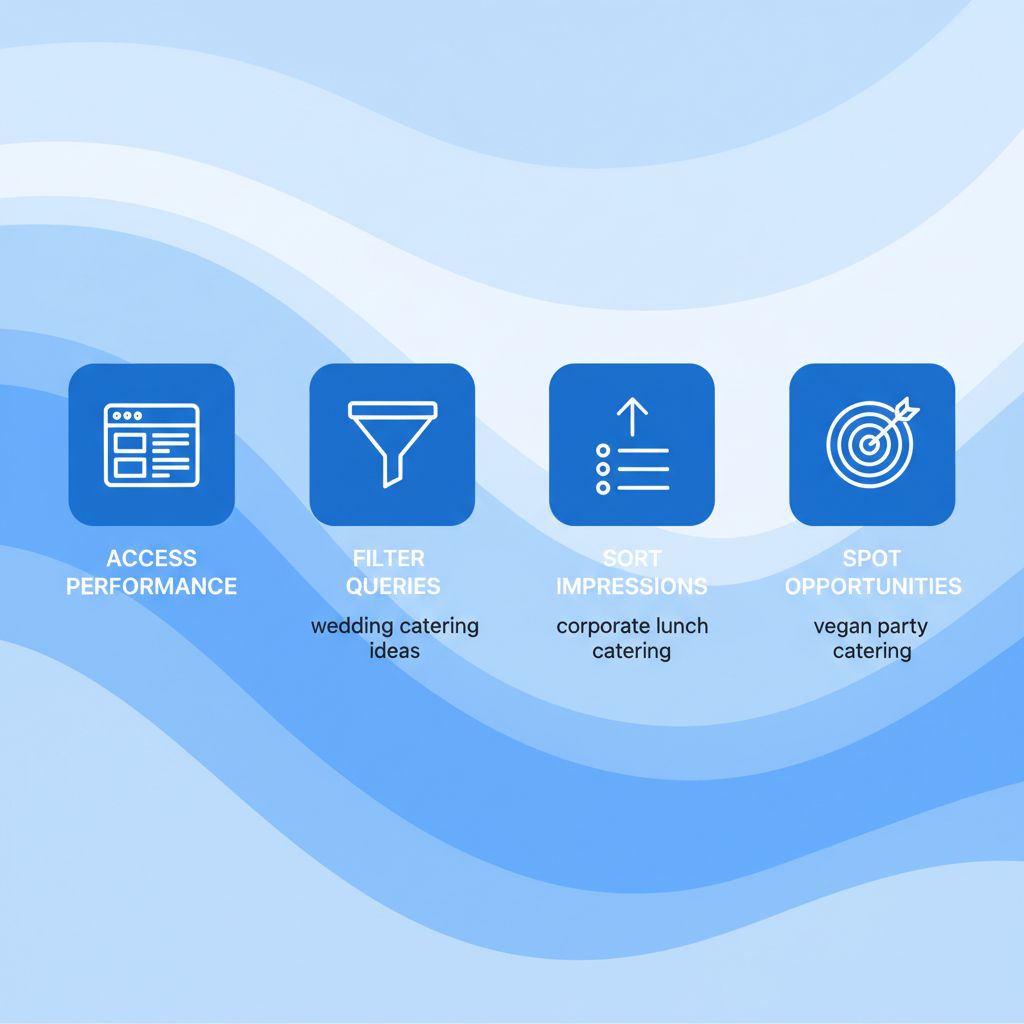
Keyword research process using Google Search Console for catering leads
Why invest time in Google Search Console keyword research? It provides actionable data on what potential clients are searching for, helping you align content with real user intent and boost organic traffic for catering businesses. By analyzing impressions and click-through rates, we can identify gaps and improve rankings, ultimately generating more predictable catering leads.
For practical tips, compare your top queries against competitors using external tools, and regularly review the report to track improvements. Advanced techniques from Google Search Central, like filtering by device or country, enhance query analysis for localized catering SEO. As we move to backlink strategies, remember to monitor toxic links with the disavow backlinks tool to maintain site authority.
Checking Backlinks in Google Search Console
In the competitive world of catering lead generation, building site authority through quality backlinks is essential for establishing trust and attracting high-intent inquiries. We at Catering Growth Engine emphasize monitoring these links as part of a comprehensive digital strategy to enhance your online presence. Using Google Search Console, caterers can easily review their backlink profile to ensure it supports predictable catering leads without harmful influences.
To begin, access your Google Search Console account and navigate to the Links report under the Indexing section. This tool provides insights into both internal and external links pointing to your site. Filter the results to separate internal links, which help with site navigation for event inquiries, from external ones that build broader authority. Next, evaluate the anchor text used in these links; relevant phrases related to catering services, such as wedding events or corporate functions, indicate strong, natural connections.
Identifying toxic links is crucial to avoid penalties that could harm your visibility. Look for links from low-quality or spammy sites, and use the disavow tool if necessary to protect your domain. Complement this process with google search console keyword research to align backlinks with targeted terms, and review the google search console performance report for overall traffic impacts. By regularly checking backlinks, we help our clients maintain a robust foundation that drives qualified leads through our Done-for-You SEO services for caterers.
Disavowing Harmful Backlinks Using Google Search Console
After reviewing your backlink profile in our SEO audits for catering websites, we may recommend disavowing toxic links that could harm your search rankings. The Google Search Console disavow tool is an advanced option for addressing spammy or low-quality backlinks, such as those from paid schemes violating Google’s policies. Use it cautiously, only after attempting to remove links directly from sources, as improper use might affect your site’s visibility.
To disavow, first create a text file listing problematic URLs or domains. Prefix domains with ‘domain:’ and save as a UTF-8 .txt file under 2MB. Upload this via Google Search Console for your property; a new file replaces the old one. We advise monitoring the performance report in Google Search Console post-upload, noting changes may take weeks. For keyword research in Google Search Console, cross-reference to ensure your catering leads traffic remains stable. This step protects your high-intent catering inquiries without risking penalties.
Improving SEO with Google Search Console Insights
At Catering Growth Engine, we harness insights from Google Search Console to refine SEO strategies that drive predictable catering leads. This powerful tool reveals how search engines interact with your site, enabling targeted optimizations for high-intent catering inquiries. By analyzing the google search console performance report, we identify top-performing pages and refine content to better align with user search intent, such as wedding and corporate event queries.
We start with google search console keyword research to uncover valuable terms like ‘catering services near me,’ optimizing landing pages for better visibility. Addressing indexing issues ensures all high-converting funnels are crawlable, while tracking improvements measures organic traffic growth. Integrating these insights with our paid ad campaigns amplifies reach, turning data into actionable steps for our Done-for-You lead generation. This approach not only boosts rankings but also enhances conversion rates, helping caterers secure more bookings efficiently.
Common Google Search Console Issues and Fixes for Caterers
At Catering Growth Engine, we understand how vital tools like Google Search Console are for monitoring your catering website’s SEO performance. As you implement strategies to attract high-intent catering inquiries, encountering issues can disrupt your progress. Common problems include verification failures, delayed data, and crawl errors, particularly for sites focused on local events and menus. These hurdles often stem from technical setup oversights or temporary Google processing delays, but with our guidance, you can resolve them efficiently to maintain visibility in searches for wedding catering or corporate events.
To address these, start with verification errors, such as ‘tag not detected.’ Ensure your HTML meta tag is correctly placed in the homepage’s <head> section without any blocking scripts or redirects, as outlined in official Google guidelines. For no data in the Google Search Console performance report, wait 48-72 hours after verification, as indexing takes time; also, check for unintended filters excluding your catering location pages. Crawl errors might appear if robots.txt blocks key URLs like your event portfolio—review and adjust to allow access. Mobile usability warnings are frequent for catering sites with image-heavy menus; test and fix responsiveness to avoid penalties in local searches. For query glitches, leverage Google Search Console keyword research to identify mismatched terms, refining your content for better alignment with user intent like ‘catering services near me.’ Use the troubleshooting dashboard as your error resolution tool to pinpoint issues quickly.
- Verify ownership via HTML tag or Google Analytics if tag fails.
- Clear filters and submit sitemaps for faster indexing.
- Audit mobile pages and submit fixes directly in the tool.
- Disavow toxic backlinks through the dedicated report if spam affects rankings.
If persistent problems arise, such as complex local indexation errors for multi-city catering operations, contact Google support or reach out to us. Our team specializes in resolving these for catering campaigns, ensuring seamless SEO monitoring and predictable leads without downtime.
Elevate Your Catering Business with Google Search Console Mastery
Mastering Google Search Console equips your catering business with powerful insights to boost SEO and attract high-intent inquiries. From initial setup to analyzing the performance report and conducting keyword research, we’ve guided you through optimizing your online presence. This free SEO mastery tool reveals backlink opportunities and site performance, helping you refine strategies that drive qualified leads directly to your inbox.
By integrating Google Search Console data with targeted funnels, caterers can enhance visibility in competitive markets like weddings and corporate events. Our done-for-you services build on these insights, delivering predictable catering leads through custom landing pages and geo-targeted campaigns. We emphasize no long-term contracts and our Work for Free guarantee, ensuring you see results without risk.
Ready to transform your lead generation? Schedule a free consultation today to explore tailored plans that unlock your business’s potential. Results may vary, but our approach is designed for sustainable growth. Past results do not guarantee future outcomes.
Resources
- Get High-Intent Leads with Catering SEO Services
- Optimize SEO for Predictable Catering Leads
- Generate Online Catering Leads with Done-for-You System
- Leverage People Also Ask for Catering Leads Guide
- Boost Catering SEO with Local Keyword Targeting
- Manage PPC for Effective Catering Lead Generation
- Discover Top SEO Reporting Tools for Agoura Hills
- Master Google Search Console Performance Insights
- Access Free Google Search Console API Data
- Disavow Harmful Backlinks Using Google Tool
- Verify Website Ownership via Search Console Methods
- Explore Google Search Central SEO Guides